HTTP Interception
Guida can intercept HTTP requests before they leave the browser, letting you inspect headers and bodies, modify requests on the fly, mock responses, or replay captured requests with edits. It uses the browser’s built-in CDP Fetch domain — no proxy configuration or SSL certificates required.
Intercept Pane
Section titled “Intercept Pane”Click Enable Intercept to start pausing all outgoing requests. Every request is held in a list until you decide what to do with it.
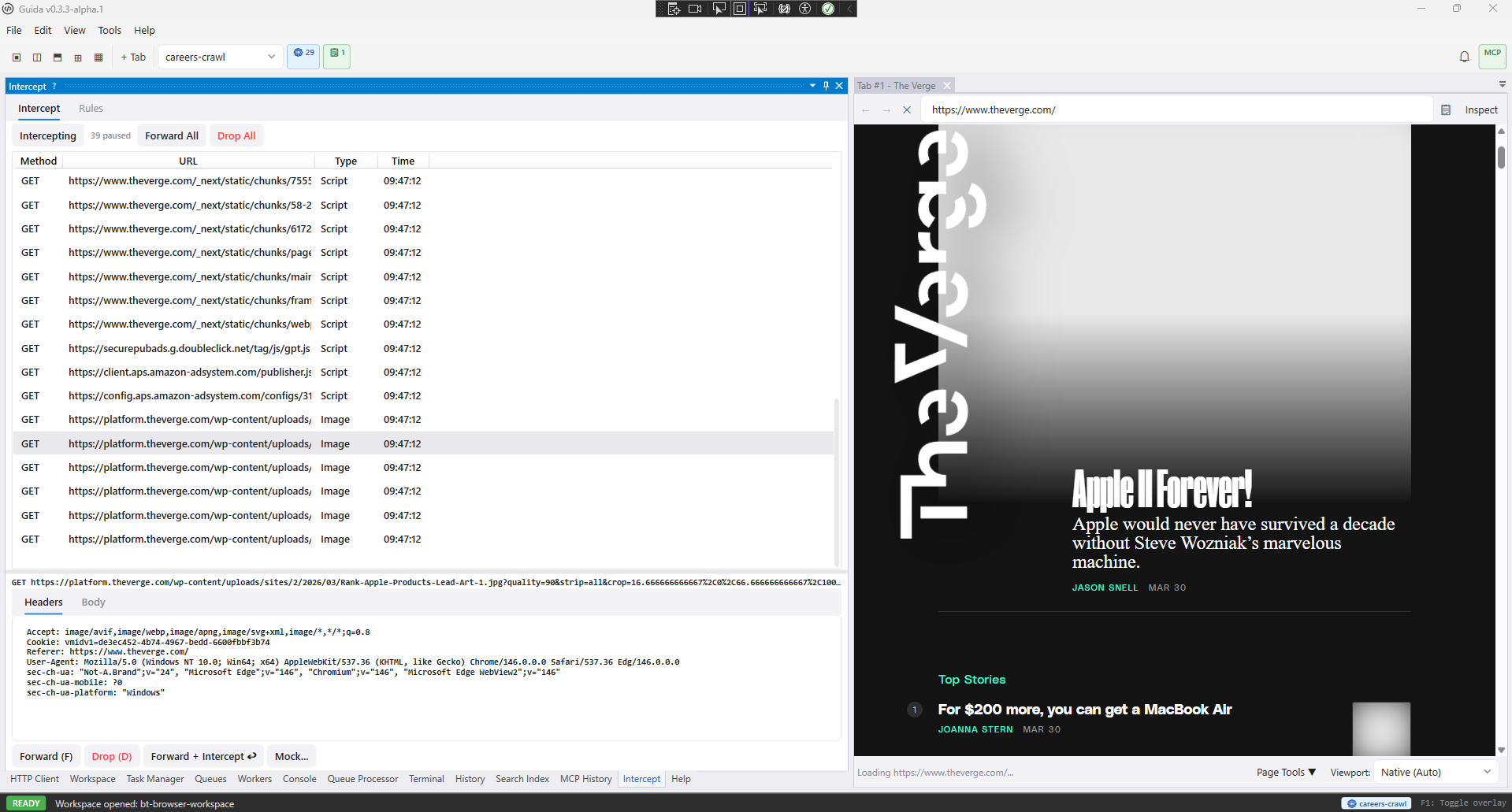
The Intercept pane pauses matching browser requests so you can inspect headers and bodies before forwarding, dropping, or mocking them.
Actions
Section titled “Actions”| Action | Shortcut | What it does |
|---|---|---|
| Forward | F | Continue the request to the server |
| Drop | D | Abort the request |
| Mock | — | Return a custom response without contacting the server |
| Forward + Intercept ↩ | — | Forward the request and pause the response when it arrives |
| Forward All | — | Continue all paused requests at once |
| Drop All | — | Abort all paused requests |
Select a paused request to inspect its headers and body in the detail panel. The body is editable for POST/PUT requests.
Response Interception
Section titled “Response Interception”To inspect a response body (a JS file, JSON API response, HTML page, etc.), click Forward + Intercept ↩ instead of Forward. The request is sent to the server and the list item transitions in place to show the response status, headers, and decoded body. You can then forward the response to the browser, drop it, or replace it with a mock.
Switch to the Rules tab to add persistent interception rules. Each rule has a URL glob pattern, an optional HTTP method filter, and an action:
| Action | Behavior |
|---|---|
| Pause | Hold matching requests for manual review (same as the default) |
| Continue | Let matching requests pass through without pausing |
| Block | Abort matching requests with a network error |
| Mock | Return a custom response for matching requests |
Rules take priority over the default pause-all behavior. For example, adding a Continue rule for *.css lets stylesheets load normally while everything else is paused.
HTTP Client
Section titled “HTTP Client”The HTTP Client pane lets you replay and modify captured requests — a built-in alternative to Postman or Insomnia.
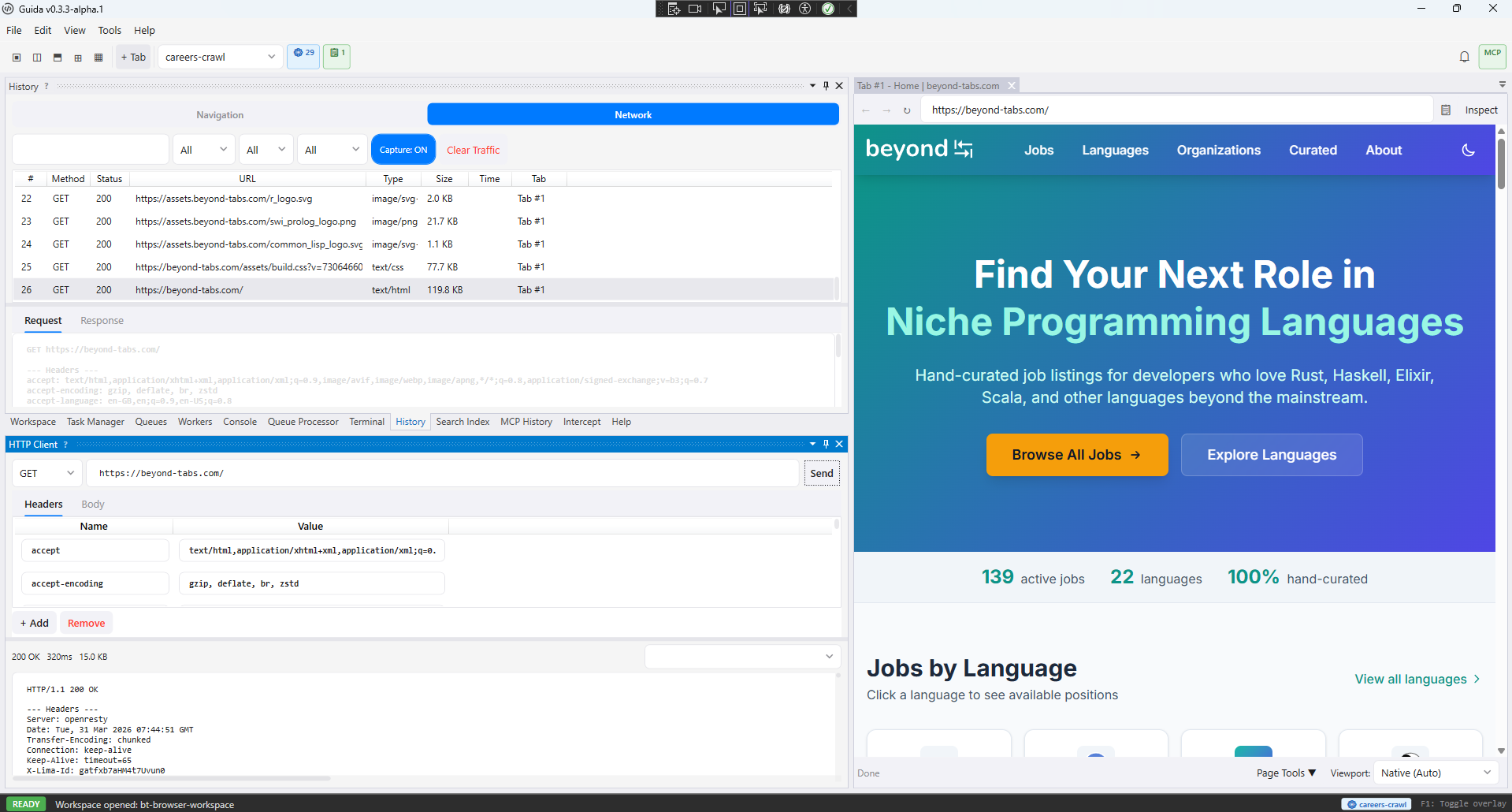
The HTTP Client replays captured requests with editable method, URL, headers, body, and response history.
Sending a Request
Section titled “Sending a Request”- Open the History pane and switch to the Network tab
- Right-click any request and choose Send to HTTP Client
- The pane opens with the method, URL, headers, and body pre-populated
Edit anything — change the method, tweak a header, modify the body — then click Send. The response appears in the bottom panel with status code, response time, headers, and body (JSON is automatically pretty-printed).
Request History
Section titled “Request History”The dropdown in the bottom-right stores all previous sends. Select an entry to restore both the request parameters and its response, making it easy to compare across attempts.
Scripting API
Section titled “Scripting API”The g.intercept.* namespace lets scripts control interception programmatically:
// Block ad/tracking requests during navigationg.intercept.enable();g.intercept.addRule("https://ads.example.com/*", { action: "block" });g.intercept.addRule("https://tracking.example.com/*", { action: "block" });
await g.nav.navigateToUrl("https://example.com");
// Clean up when doneg.intercept.clearRules();g.intercept.disable();| Method | Description |
|---|---|
g.intercept.enable() | Turn on request interception |
g.intercept.disable() | Turn off interception and release all paused requests |
g.intercept.isEnabled() | Check if interception is active |
g.intercept.addRule(pattern, options?) | Add a rule, returns rule ID |
g.intercept.removeRule(ruleId) | Remove a specific rule |
g.intercept.clearRules() | Remove all rules |
g.intercept.listRules() | List active rules |
Script-Action Rules
Section titled “Script-Action Rules”Rules with action: "script" run a JavaScript file for each matching request. The script receives the request via g.intercept.getRequest() and decides what to do:
// intercept-handler.js — runs per-requestconst req = g.intercept.getRequest();
// Add a custom header and continueg.intercept.continue({ headers: { "X-Custom-Auth": "my-token" }});| Method | Description |
|---|---|
g.intercept.getRequest() | Get the paused request (URL, method, headers, body) |
g.intercept.continue(options?) | Forward with optional modified headers/URL |
g.intercept.respond(status, headers?, body?) | Return a mock response |
g.intercept.abort(reason?) | Abort the request |
Next Steps
Section titled “Next Steps”- Capture network traffic — record and inspect requests from a script
- MCP Integration — expose browser automation to external AI clients
- Custom Tools — workspace-scoped MCP tools backed by scripts
- Secrets — encrypted credential storage for API authentication
- API Reference — full scripting API documentation