Database Integrations
Guida can connect to external databases, search clusters, and object storage directly from scripts. Connection credentials are stored as encrypted secrets — you pass the secret name as the conn parameter, and Guida resolves the connection string at runtime. All database integrations are blocked for MCP-origin scripts (same security model as g.secrets.getSecret()).
Connection Pattern
Section titled “Connection Pattern”Every database method takes a conn parameter — the name of a secret containing the connection string. This keeps credentials out of your scripts:
// Secret "my-pg" contains: Host=localhost;Database=mydb;Username=user;Password=passconst rows = await g.postgres.query("my-pg", "SELECT * FROM products WHERE price < $1", [20.00]);Connections are automatically pooled and reused across calls within a script.
Setup steps:
- Open the Secrets pane
- Click the dedicated button (Add S3 Connection, Add MongoDB, or Add PostgreSQL) — each opens a typed dialog with the right fields
- Use the secret name in your scripts
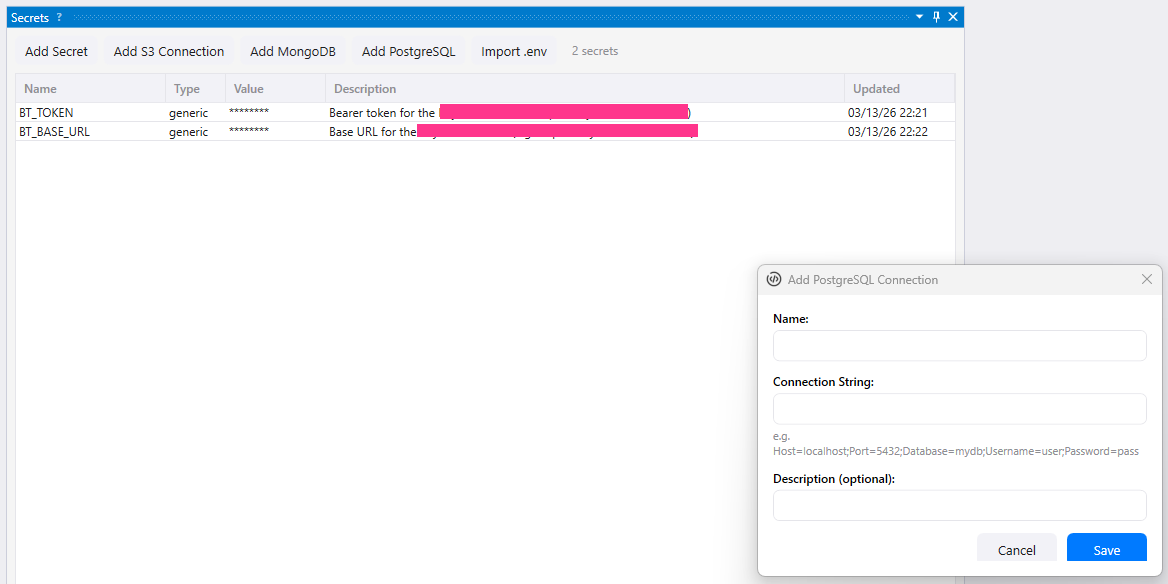
Database connection dialogs store connection strings as encrypted secrets that scripts use by name.
S3-Compatible Object Storage
Section titled “S3-Compatible Object Storage”g.s3.* connects to any S3-compatible service — AWS S3, MinIO, DigitalOcean Spaces, Backblaze B2, etc.
Connection string format:
endpoint=s3.amazonaws.com;accessKey=AKIA...;secretKey=...;region=us-east-1;secure=trueFor MinIO running locally:
endpoint=127.0.0.1:9000;accessKey=minioadmin;secretKey=minioadmin;secure=falseUse cases:
- Back up scraped data to cloud storage
- Store screenshots and full-page captures
- Generate presigned download links to share results
- Move files between buckets as part of a pipeline
Example
Section titled “Example”async function main() { // Upload scraped data as JSON const data = { products: [{ name: "Widget", price: 9.99 }] }; await g.s3.putObjectText( "my-s3", "scraping-results", "exports/products.json", JSON.stringify(data, null, 2), "application/json" );
// Generate a shareable download link (24 hours) const url = await g.s3.getPresignedUrl("my-s3", "scraping-results", "exports/products.json", { expiry: 86400 }); g.log("Download: " + url);}12 methods total — see the API Reference for the full list.
MongoDB
Section titled “MongoDB”g.mongodb.* connects to MongoDB for document storage, querying, and aggregation.
Connection string format (standard MongoDB URI):
mongodb://user:password@localhost:27017For MongoDB Atlas:
mongodb+srv://user:[email protected]Use cases:
- Store scraped documents with flexible schemas
- Run aggregation pipelines for analysis
- Bulk insert/update with
insertManyandbulkWrite - Index fields for fast lookups
Example
Section titled “Example”async function main() { const conn = "my-mongo";
// Insert scraped products const result = await g.mongodb.insertMany(conn, "scraping", "products", [ { name: "Widget A", price: 9.99, category: "tools" }, { name: "Widget B", price: 14.99, category: "tools" }, { name: "Gadget C", price: 29.99, category: "electronics" } ]); g.log("Inserted " + result.insertedCount + " documents");
// Query with filter and sort const docs = await g.mongodb.find(conn, "scraping", "products", { price: { $lt: 20 } }, { sort: { price: 1 } } ); g.log("Cheap products: " + docs.length);
// Aggregate by category const stats = await g.mongodb.aggregate(conn, "scraping", "products", [ { $group: { _id: "$category", count: { $sum: 1 }, avgPrice: { $avg: "$price" } } } ]); for (const s of stats) { g.log(s._id + ": " + s.count + " items, avg $" + s.avgPrice.toFixed(2)); }}17 methods total — see the API Reference for the full list.
PostgreSQL
Section titled “PostgreSQL”g.postgres.* connects to PostgreSQL for relational queries, transactions, and bulk operations.
Connection string format (standard Npgsql):
Host=localhost;Database=mydb;Username=user;Password=passAll queries use positional parameters ($1, $2, …) — Guida never interpolates values into SQL strings, preventing SQL injection.
Use cases:
- Store structured data with relational integrity
- Wrap multi-step operations in transactions
- Bulk-import data with
copyFrom(COPY protocol — dramatically faster than row-by-row INSERT) - Introspect schemas, tables, indexes, and constraints
Example
Section titled “Example”async function main() { const conn = "my-pg";
// Query with parameters try { const rows = await g.postgres.query(conn, "SELECT id, name, price FROM products WHERE category = $1 ORDER BY price", ["electronics"] );
// Transaction: insert order + update stock atomically const result = await g.postgres.transaction(conn, async (tx) => { await tx.execute( "INSERT INTO orders (product_id, qty) VALUES ($1, $2)", [42, 3] ); await tx.execute( "UPDATE products SET stock = stock - $1 WHERE id = $2", [3, 42] ); return await tx.scalar("SELECT count(*) FROM orders"); }); g.log("Total orders: " + result);
// Bulk import via COPY (fast) const copyResult = await g.postgres.copyFrom(conn, "products", [ ["Widget A", 9.99, 100], ["Widget B", 14.99, 50] ], { columns: ["name", "price", "stock"] }); g.log("Imported " + copyResult.rowsCopied + " rows"); } catch (e) { g.log("Error: " + e.message); }}14 methods total — see the API Reference for the full list.
Security
Section titled “Security”All database integrations follow the same security model as secrets:
- MCP-origin scripts are blocked. When an AI agent runs a script via MCP, all
g.s3.*,g.mongodb.*, andg.postgres.*calls return an error. This prevents the AI from accessing external databases through scripted automation. - Workers inherit their launcher’s origin. If MCP starts a worker pool, those workers are also blocked from database access.
- User-initiated scripts have full access. Scripts run via F5, event triggers, and queue processors can use all database methods.
Connection strings are never exposed via MCP tools — the AI only sees the secret name, not the credentials.
Next Steps
Section titled “Next Steps”- API Reference — full method signatures and interfaces for S3-compatible storage, MongoDB, and PostgreSQL
- Secrets — managing encrypted connection credentials
- Workspaces — workspace-scoped storage and configuration
- Scrape and store page data — start with workspace-local storage before adding external databases