Scripting Overview
Guida includes a full scripting environment for browser automation. Scripts interact with pages, manage data, and orchestrate workflows through the g.* API.
Script Engines
Section titled “Script Engines”Three engines are available:
- JavaScript (ClearScript V8) — Full ES2024+ compatibility, top-level await, native Promises, and ES module imports. Powered by the same V8 engine used in Chrome and Node.js.
- Lua (LuaCSharp) — Clean, table-based API using standard Lua syntax. Fully integrated with workspace libraries via
require(). - Janet (JanetSharp) — Expressive functional Lisp dialect with immutable data structures and a powerful built-in PEG (Parsing Expression Grammar) engine.
All three engines share the same g.* API surface.
Basic Structure & Top-Level Await
Section titled “Basic Structure & Top-Level Await”Because automation scripts are fundamentally asynchronous, Guida supports top-level await for scripts that do not require an early return statement:
// Top-level await works out of the boxconst tabs = g.tabs.getTabs();g.log("Open tabs: " + tabs.length);For scripts that need to return early, wrap your code in an async function main() and await main(); at the end.
Press F5 in the script editor to run.
Error Handling
Section titled “Error Handling”Error handling in Guida depends on the engine you are using.
JavaScript & Janet: Exceptions
Section titled “JavaScript & Janet: Exceptions”In JavaScript and Janet, all g.* methods return values directly and throw exceptions on error. In JavaScript, use try/catch to handle errors:
try { await g.dom.click("#submit");} catch (e) { g.log("Click failed: " + e.message); return;}Lua: Multiple Returns
Section titled “Lua: Multiple Returns”In Lua, the g.* API uses idiomatic multiple returns (nil, error) instead of throwing exceptions. This ensures that the Visual Studio debugger doesn’t break on “unhandled” exceptions during development.
Always check the first return value for success:
local success, err = g.nav.navigateToUrl("https://example.com")if not success then g.log("Error: Navigation failed: " .. err)else g.log("Page loaded successfully")endAsync Methods
Section titled “Async Methods”Many browser operations are async. In JavaScript, use await. In Lua and Janet, calls are automatically awaited by the engine:
JavaScript:
async function main() { await g.nav.navigateToUrl("https://example.com"); await g.dom.waitForDomStable(); const html = await g.page.getDom(); g.log("Page loaded, DOM length: " + html.length);}Lua:
g.nav.navigateToUrl("https://example.com")g.dom.waitForDomStable()local html = g.page.getDom()g.log("Page loaded, DOM length: " .. #html)Janet:
(g.nav.navigateToUrl "https://example.com")(g.dom.waitForDomStable)(def html (g.page.getDom))(g.log (string "Page loaded, DOM length: " (length html)))Shared Libraries
Section titled “Shared Libraries”Guida allows you to write reusable functions in shared files.
JavaScript (ES Modules)
Section titled “JavaScript (ES Modules)”Use standard ES import/export syntax. Path is resolved relative to the calling script’s directory, falling back to the workspace root.
lib/helpers.js:
export async function loginToApp(username, password) { await g.nav.navigateToUrl("https://example.com/login"); await g.dom.enterText("#user", username); await g.dom.enterText("#pass", password); await g.dom.click("#submit");}myscript.js:
import { loginToApp } from "./lib/helpers.js";
await loginToApp("admin", "secure123");const data = await g.dom.extractContent(".stats");g.log("Dashboard stats: " + data);
Lua (Modules)
Section titled “Lua (Modules)”Use the standard require() function. Guida searches for modules in the workspace lib/ folder and the current workflow’s lib/ and scripts/ folders.
lib/utils.lua:
local M = {}function M.hello() g.log("Hello from library!") endreturn Mmyscript.lua:
local utils = require("utils")utils.hello()Janet (Modules)
Section titled “Janet (Modules)”Use the import macro to load Janet modules from the workspace lib/ and scripts/ folders.
lib/utils.janet:
(defn hello [] (g.log "Hello from Janet library!"))myscript.janet:
(import utils)(utils/hello)Timeout Pragma
Section titled “Timeout Pragma”Set a script execution timeout (in milliseconds):
// @timeout 60000
async function main() {  // This script will be cancelled after 60 seconds}
The default timeout is 10 seconds. Place the pragma before any code.
Context Pragma
Section titled “Context Pragma”Guard scripts that depend on g.worker.getContext() from running outside a worker context:
// @require-context
async function main() {  const ctx = g.worker.getContext();  // This script will only run inside a queue processor or worker pool}
If the script is run standalone (F5, MCP, event trigger), it fails immediately with a clear error instead of failing mid-execution. See Queues and Review for details.
Logging
Section titled “Logging”Use g.log() to write to the Console pane:
g.log("Processing item: " + item.name);Script Editor
Section titled “Script Editor”The built-in editor provides:
- IntelliSense — auto-completions for all
g.*methods and their parameters - Signature help — parameter hints shown when typing
( - Hover docs — type information on mouse hover
- Chrome DevTools Debugging — click the Debug button on any
.jsfile to launch an external Chrome DevTools instance connected directly to the V8 engine. Set breakpoints, step through code, and inspect variables using the standard Chrome interface. - Find/replace — with regex support
- Bracket matching and indentation guides
Stealth Navigation
Section titled “Stealth Navigation”Some websites detect automated browsers. Use stealth: true to inject anti-detection patches before page scripts run:
await g.nav.navigateToUrl("https://example.com", { stealth: true });This applies five patches: hides navigator.webdriver, injects window.chrome.runtime, fixes Permissions.prototype.query, fakes navigator.plugins, and sets navigator.languages to ["en-US", "en"].
For granular control, pass a StealthOptions object to enable/disable individual patches. You can also detect JavaScript-based redirects with { detectRedirects: true }. See the API Reference for full details.
Text-to-Speech
Section titled “Text-to-Speech”Guida includes text-to-speech via Windows Speech Synthesis. Configure the default voice and speech rate in Settings > TTS.
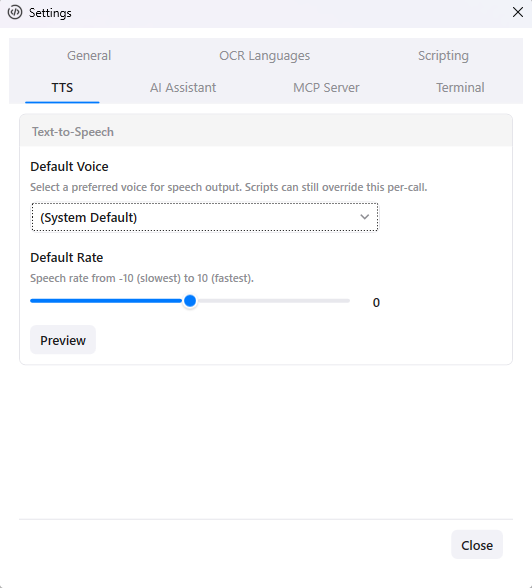
Scripts can speak text and override defaults per-call:
await g.tts.speak("Processing complete", { voice: "Microsoft David", rate: 2 });See the API Reference for all methods.
Lua Differences
Section titled “Lua Differences”All Guida automation methods are available through the global g namespace. While JavaScript and Lua share the same API surface, there are two key differences in how they are used:
1. Dot Syntax (No Colon)
Section titled “1. Dot Syntax (No Colon)”Unlike some other C# Lua integrations, Guida’s API uses the dot (.) operator for all calls (e.g., g.dom.click("#btn")). Do not use the colon (:) operator (e.g., g.dom:click), as the API methods are bound directly to C# services and do not expect a self argument.
2. Tab Tables
Section titled “2. Tab Tables”Lua uses tables for data structures. When an API method returns an object (like a browser tab or a document from the store), it is returned as a Lua table with standard 1-based indexing for arrays.
-- Working with the document storelocal doc, err = g.store.get("products", "item-1")if doc and doc.data then g.log("Found product: " .. doc.data.name)endJanet Differences
Section titled “Janet Differences”Janet is a functional, Lisp-like language. Its syntax is heavily based on s-expressions (parentheses) and prefix notation.
1. Function Calls
Section titled “1. Function Calls”Instead of using dot notation with parentheses outside like g.dom.click("#btn"), you wrap the entire expression in parentheses: (g.dom.click "#btn").
2. Dictionaries and Structs
Section titled “2. Dictionaries and Structs”When an API method returns an object (like a TabInfo or a document from the store), it is returned as a Janet dictionary. You access properties using the get or get-in function:
# Working with the document store(def doc (g.store.get "products" "item-1"))(if doc (g.log (string "Found product: " (get (get doc "data") "name"))))Next Steps
Section titled “Next Steps”- API Reference — full method listing for all
g.*namespaces - Recipes — practical scripts based on real examples from the app
- Workspaces — organize scripts, data, and config in workspace folders
- Quick Start — hands-on 5-minute walkthrough