LLM Setup
Guida can use a local LLM for in-script inference — classifying content, extracting structured data, generating summaries, or answering questions about page content. Two providers are supported.
Providers
Section titled “Providers”Ollama (Recommended)
Section titled “Ollama (Recommended)”Ollama runs models as a local server. Best for most users — easy setup, model management, and vision support.
Setup:
- Install Ollama
- Pull a model:
ollama pull llama3.2 - In Guida, go to Settings > AI Assistant
- Select Ollama as the provider
- Set the endpoint (default:
http://127.0.0.1:11434) - Choose your default model from the dropdown
Ollama supports multiple model slots:
| Slot | Used for |
|---|---|
| Default | General prompts via g.llm.promptLocalLlm() |
| Code | Code-specific tasks (optional) |
| Vision | Image understanding with image parameter (optional) |
| Voice | Voice command processing (optional) |
LlamaSharp (Offline)
Section titled “LlamaSharp (Offline)”LlamaSharp loads GGUF model files directly — no server needed. Best for fully offline use.
Setup:
- Download a GGUF model file (e.g., from Hugging Face)
- In Guida, go to Settings > AI Assistant
- Select LlamaSharp as the provider
- Browse to your GGUF file (or paste a download URL — Guida saves to
%AppData%/Guida/models/) - Configure context size and GPU layers
LlamaSharp supports the same multi-model slots (default, code, voice). Vision support will be added in future releases.
Model loading is deferred until first use. You can trigger it manually as required.
In-App Experience
Section titled “In-App Experience”The LLM Insights pane tracks every request — model, source, duration, success rate, and total token usage. Select any entry to see the full prompt and response with token counts and throughput:
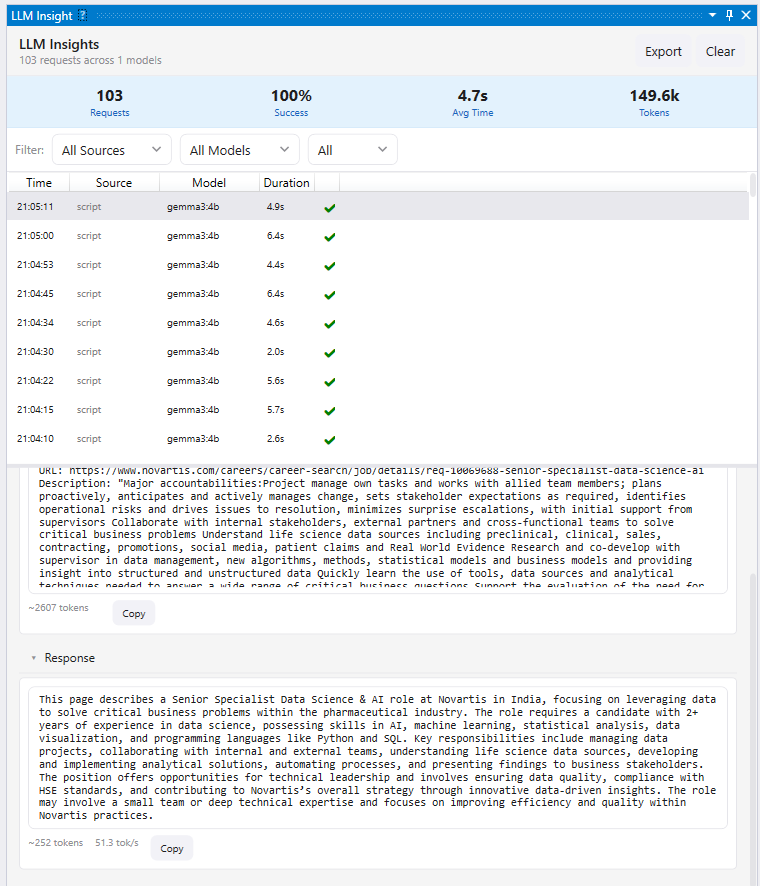
LLM Insights makes local model calls inspectable, including prompt, response, timing, token counts, and throughput.
Scripting API
Section titled “Scripting API”g.llm.promptLocalLlm(model, prompt, options?)
Section titled “g.llm.promptLocalLlm(model, prompt, options?)”Send a prompt to the configured LLM:
async function main() { try { const response = await g.llm.promptLocalLlm( "llama3.2", "Summarize this text in one sentence: " + pageText ); g.log("Summary: " + response); } catch (e) { g.log("LLM error: " + e.message); }}Options:
{ timeout?: number // milliseconds image?: string // base64-encoded image (Ollama vision models only)}g.llm.abortLocalLlm()
Section titled “g.llm.abortLocalLlm()”Cancel an in-progress LLM request.
g.llm.getLocalLlmModels()
Section titled “g.llm.getLocalLlmModels()”List available models (returns model names and sizes for Ollama, or configured GGUF paths for LlamaSharp):
async function main() { const models = await g.llm.getLocalLlmModels(); for (const m of models) { g.log(m.name + " (" + (m.size / 1e9).toFixed(1) + " GB)"); }}Example: Content Classification
Section titled “Example: Content Classification”async function main() { await g.nav.navigateToUrl("https://news.example.com/article/123"); await g.dom.waitForDomStable();
const content = await g.dom.extractContent("article"); const category = await g.llm.promptLocalLlm( "llama3.2", "Classify this article into exactly one category: Tech, Business, Science, Sports, Other.\n\n" + content );
g.store.put("articles", "article-123", { category: category.trim(), classifiedAt: new Date().toISOString() });}Provider Switching
Section titled “Provider Switching”Change the active provider in Settings > AI Assistant at any time. The change takes effect immediately — no restart needed.
Next Steps
Section titled “Next Steps”- Ask the local LLM — run a practical page-summary script with a configured local model
- API Reference — LLM method signatures
- Scripting Overview — learn the
g.*API - Queue Workers — use LLM classification in batch processing pipelines