Queue Workers
Queue workers process items from work queues using concurrent browser tabs. Each worker gets its own tab, dequeues items, runs a script against each one, and commits or aborts the result.
Concept
Section titled “Concept”- You enqueue work items (URLs, data records, tasks)
- Workers dequeue items and process them — each in its own browser tab
- Your per-item script calls
g.worker.getContext()to get the item, does its work, then callsg.queue.commit()org.queue.abort()
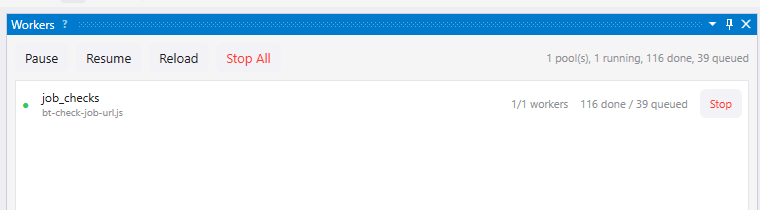
The Workers pane shows active pools, processed counts, failures, queue depth, and controls for pausing or stopping work.
Two Ways to Define Workers
Section titled “Two Ways to Define Workers”Declarative: queues.json
Section titled “Declarative: queues.json”Create a queues.json file in your workspace root:
{ "pools": [ { "queue": "urls", "script": "scripts/process-url.js", "concurrency": 3, "throttle": 30, "layout": "horizontal", "clearTabs": true } ]}| Field | Required | Default | Description |
|---|---|---|---|
queue | Yes | — | Queue name to process |
script | Yes | — | Script path relative to workspace root |
concurrency | No | 1 | Number of concurrent workers (tabs) |
throttle | No | 60 | Max dequeues per minute per worker |
layout | No | — | Tab layout: horizontal, vertical, or quad |
clearTabs | No | false | Close all existing tabs before starting |
requiresWorkflowEnvelope | No | false | Require each queue item to carry workflow ledger metadata before execution |
Start a declared pool from the Queue Console, the lightweight Queues pane, or MCP tools.
Programmatic: g.workers.start()
Section titled “Programmatic: g.workers.start()”async function main() { // Enqueue some work for (let i = 1; i <= 100; i++) { g.queue.enqueue("pages", { url: "https://example.com/page/" + i }); }
// Start workers g.workers.start({ clearTabs: true, layout: "horizontal", workers: [ { queue: "pages", script: "scripts/scrape-page.js", concurrency: 4, throttle: { requestsPerMinute: 20 }, requiresWorkflowEnvelope: false } ] });}g.workers.start() is fire-and-forget — workers run independently of the launcher script.
Per-Item Script
Section titled “Per-Item Script”Each worker runs your script once per queue item. The script must:
- Call
g.worker.getContext()to get the item and tab ID - Do its work
- Call
g.queue.commit()org.queue.abort()
async function main() {  const ctx = g.worker.getContext();  const { item, tabId, queueName } = ctx;
  // Navigate in this worker's tab  await g.nav.navigateToUrl(item.data.url, { browserTabId: tabId });  await g.dom.waitForDomStable({ browserTabId: tabId });
  // Extract data  const title = await g.dom.extractContent("h1", { browserTabId: tabId });
  // Store result  g.store.put("results", item.data.url, {    title: title,    scrapedAt: new Date().toISOString()  });
  // Mark complete  g.queue.commit(item.id);}
There is no auto-commit — you must explicitly commit or abort each item.
Handling Failures
Section titled “Handling Failures”If your script aborts an item and it has exceeded its maxRetries, the item moves to the dead-letter queue (dead_{queueName}). You can inspect and retry dead-letter items:
const deadItems = g.queue.deadLetter("pages");g.log("Failed items: " + deadItems.length);
// Retry a specific itemg.queue.retry("pages", deadItems[0].deadLetterId);
Controlling Workers
Section titled “Controlling Workers”| Method | Description |
|---|---|
g.workers.stop() | Stop all workers |
g.workers.stop("pages") | Stop workers for a specific queue |
g.workers.pause() | Pause dequeuing (in-progress items finish) |
g.workers.resume() | Resume dequeuing |
g.workers.status() | Get status of all pools |
Status returns an array of pool snapshots:
{ queueName: string script: string scope: string state: string concurrency: number throttleRequestsPerMinute: number layout: string clearTabs: boolean dequeueStrategy: string requiresWorkflowEnvelope: boolean requiresBrowser: boolean activeWorkers: number inFlightItems: number processed: number failed: number remaining: number | null remainingKnown: boolean eligibleRemaining: number | null heldItemCount: number heldGroupCount: number nextEligibleAt: string | null waitingReason: string | null paused: boolean activeRunOneCount: number runOneTaskId: string | null}remaining can be unknown; check remainingKnown before presenting it as an
exact queue depth. eligibleRemaining excludes work currently held by workflow
policy or queue-group cooldown. heldItemCount, heldGroupCount,
nextEligibleAt, and waitingReason explain why a running pool may have no
eligible item without being finished or stuck.
Tab Management
Section titled “Tab Management”Workers automatically create one browser tab per concurrent worker. The layout option arranges them:
horizontal— tabs side by sidevertical— tabs stackedquad— 2x2 grid (for 4 workers)
Set clearTabs: true to close all existing tabs before starting.
Throttling
Section titled “Throttling”The throttle setting controls how fast each worker dequeues items. A value of 30 means each worker waits at least 2 seconds between dequeues. With concurrency: 3 and throttle: 30, the pool processes up to 90 items per minute total.
Queue-group cooldowns can delay related items even when the pool-wide request rate permits another dequeue. Holds and cooldowns are scheduling facts, not failures; use the status fields above instead of inferring state from tab count or total queue depth.
Monitoring and operations
Section titled “Monitoring and operations”Each worker item execution appears as a task in the Task Manager pane with live duration tracking and stop buttons.
For day-to-day queue operations, use the Queue Console. It shows queue counts, pending items, dead letters, selected payloads, worker state, run-one/start/stop controls, and links to Workflow Ledger items when queue payloads contain workflow metadata.
If a worker script fails after checking out an item, Guida aborts the checkout when possible so the queue item does not remain stuck. Stopping a Run One task or worker pool should stop future work and return in-flight queue work to an inspectable state.
When items carry a workflow envelope, queue execution preserves provenance and the Workflow Ledger records the durable outcome. Reconcile the run explicitly; an empty queue or a stopped pool does not establish that every item succeeded.
When queue items are linked to workflow ledger items, queue retry and run-one paths first ensure the ledger item is claimable. If Guida cannot reconcile the queue item and ledger state, it surfaces an operator-facing error instead of creating queue work that is guaranteed to fail.
For workflow-owned queues, set requiresWorkflowEnvelope: true in queues.json or g.workers.start(). Guida then refuses to process queue items unless their payload includes a workflow envelope with workflowName, runId, itemId, and itemKey.
This is useful for long-running crawls where queue work and Workflow Ledger truth must stay in sync. Invalid checked-out work is blocked and moved to an inspectable failure state instead of looping through doomed retries.
For large pipelines that span multiple workflow folders, queues, worker pools, and ledger stages, model the operator-level intent in Workflows. The Workflow Control Console can then show which queue or worker needs attention and open the Queue Console on the relevant evidence.
Manual Review
Section titled “Manual Review”For queues that need human judgement, review-mode views provide action buttons, keyboard shortcuts, and multi-tab review mode. See Queues and Review.
Next Steps
Section titled “Next Steps”- Queues and Review — operate queues, inspect payloads, and review items
- Workflow Ledger — inspect durable workflow state and recovery history
- Workflows — describe operator-level operations and queue/ledger handoffs
- Queue URLs and process them — complete example of enqueueing, processing, and committing work items
- Run parallel workers — start multiple browser workers from a script
- API Reference —
g.queue.*— queue operations - API Reference —
g.workers.*— worker management methods - Workspaces — workspace setup for
queues.json